Oil Paint Photo Editing: Turn Normal Photos Into Art That Actually Pops
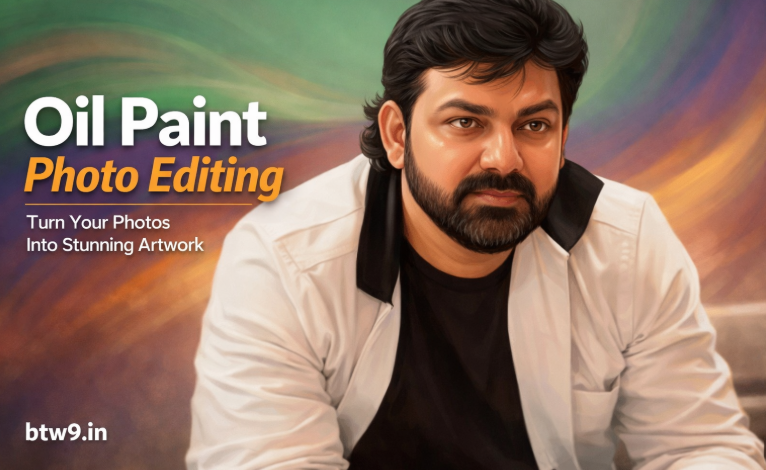
Honestly, oil paint photo editing isn’t just a trend anymore.
It’s become a go-to style for creators who want photos to feel premium.
You take a normal image.
You add texture, depth, and smooth brush strokes.
Suddenly, it looks like a real canvas painting.
That’s the magic of oil paint editing.
And no doubt, it works insanely well for portraits and creative visuals.
Let’s break it all down in a simple, real-blogger way.
What Is Oil Paint Editing, Really?
Oil paint editing copies the look of traditional oil paintings.
Think visible brush strokes, soft blending, and a slightly glossy texture.
The effect sharpens important edges.
At the same time, it smooths skin and backgrounds.
Because of that, photos feel artistic without looking fake.
That’s why photographers, designers, and Instagram creators love it.
How the Oil Paint Effect Actually Works
Let’s be real.
This isn’t magic. It’s smart editing.
Most tools use filters that adjust stylization, scale, and brush detail.
You control how strong the strokes appear.
Cleanliness settings smooth things out.
Stylization adds that hand-painted vibe.
Good lighting matters a lot here.
High-resolution photos always give better results.
Best Software for Oil Paint Editing
If you want control, desktop tools work best.
Adobe Photoshop
Photoshop’s Oil Paint filter feels the most realistic.
You can tweak lighting, texture, and brush flow.
Lightroom
It’s great for prep work.
Color correction and contrast fixes happen here first.
Mobile Apps
Apps like PicsArt make oil paint editing fast.
Perfect if you post daily on Instagram.
Mobile tools are simpler.
But honestly, they’re more than enough for social media.
Oil Paint Editing for Portrait Photos
Portraits look incredible with this effect.
No exaggeration.
Skin turns smoother but not plastic.
Eyes pop more. Facial structure stays sharp.
That’s why wedding shots and profile photos use this style a lot.
It adds elegance without trying too hard.
Just don’t overdo it.
Too much stylization kills realism.
Using Oil Paint Style on Landscapes
Now, landscapes are a different story.
Here, drama works in your favor.
Brush strokes highlight trees, clouds, and water.
Colors feel deeper and more emotional.
Travel photographers use this style for storytelling.
It makes scenes feel painted, not captured.
Why Lighting Makes or Breaks Oil Paint Editing
Lighting decides everything here.
Balanced highlights help textures look real.
Soft shadows add depth.
Bad lighting creates noise.
And once noise appears, the oil paint effect falls apart.
Always fix lighting before applying the filter.
It saves hours later.
Color Correction Comes First. Always.
Before oil paint editing, fix your colors.
Adjust brightness and contrast.
Boost saturation just a little.
Because of that, brush strokes look richer.
And the final image feels alive, not dull.
Skipping this step is a common mistake.
Don’t do it.
Customizing Texture and Brush Strokes
This is where creativity kicks in.
Higher cleanliness means smoother results.
Higher stylization means stronger strokes.
There’s no perfect setting.
You tweak until it feels right.
Sometimes subtle looks better.
Other times, bold works.
Trust your eyes, not presets.
How Professionals Get That Premium Oil Paint Look
Pros focus on details.
They retouch skin lightly.
They sharpen eyes carefully.
Backgrounds get softened, not blurred to death.
Highlights and shadows stay natural.
That’s how images become print-worthy.
Not just Instagram-ready.
Mobile Apps for Fast Oil Paint Editing
Not everyone wants complex tools.
And that’s fair.
Mobile apps offer one-tap oil paint filters.
They’re quick and beginner-friendly.
Perfect for reels, stories, and posts.
Especially if speed matters more than perfection.
Mixing Oil Paint Effect With Other Styles
Oil paint doesn’t have to stand alone.
Add glow effects for softness.
Use cinematic color grading for drama.
Vignettes help focus the subject.
These combos look amazing on Instagram feeds.
Creators use this trick a lot.
It keeps visuals fresh.
AI Prompts for Oil Paint–Style Digital Portraits
If you’re using AI tools, prompts matter a lot.
Open Gemini and Paste this prompt along with your picture.
Prompt 1
Generate a highly detailed digital portrait based on the uploaded photo. Preserve full likeness and facial structure while enhancing features with smooth warm-toned skin, symmetrical detailing, and soft glow highlights on the forehead and cheeks. Apply a realistic yet polished illustration style with glossy skin texture, sharp expressive eyes, and natural hair detail. Add cinematic soft lighting for depth. Create a colourful background with softly swirling gradient colours in green, purple, and orange tones, slightly blurred to keep focus on the subject. Use studio portrait composition, centered framing, high resolution, refined brush strokes, realistic hair texture, and 8K ultra-quality artistic digital painting finish. Don’t change facial expressions. Use the same face.
Prompt 2
Make a super detailed digital portrait from this photo. Keep the face exactly the same, but make the skin smooth and warm with perfect symmetry and a soft glow on the forehead and cheeks. Keep it realistic yet polished, with glossy skin, sharp expressive eyes, and natural hair. Use soft cinematic lighting for depth. Center the shot like a studio portrait. High resolution, refined brush strokes, realistic hair, and an 8K ultra-quality digital painting finish. Background should be studio blue.
Where Oil Paint Editing Is Commonly Used
You’ll see this style everywhere.
Album covers.
Posters.
Instagram creatives.
Digital ads.
The painted look grabs attention fast.
And it gives content a premium edge.
Simple Tips for Better Oil Paint Editing
Always start with high-resolution photos.
Low quality ruins everything.
Avoid extreme stylization.
It looks fake fast.
Keep things balanced.
That’s the real secret.
Final Thoughts
Oil paint editing turns simple photos into expressive artwork.
It adds emotion, texture, and depth.
Whether you edit on mobile or desktop, the technique works.
You just need patience and a good eye.
Once you get the hang of it,
your visuals won’t look ordinary again.